
Connect Viator
Overview
Connecting Viator to Magpie enables you to import and manage your Viator product content and reviews (reviews for Enterprise users) directly within the Magpie platform.
Setup Steps
Step 1: Access Viator Settings
Log in to Viator, open your account settings dropdown, and select Manage users.

Step 2: Add a New User
Click the Add User button in the Viator user management interface.

Step 3: Configure User Settings
Set up the new user with the required configuration settings as shown in Viator's user management interface, then click Save.
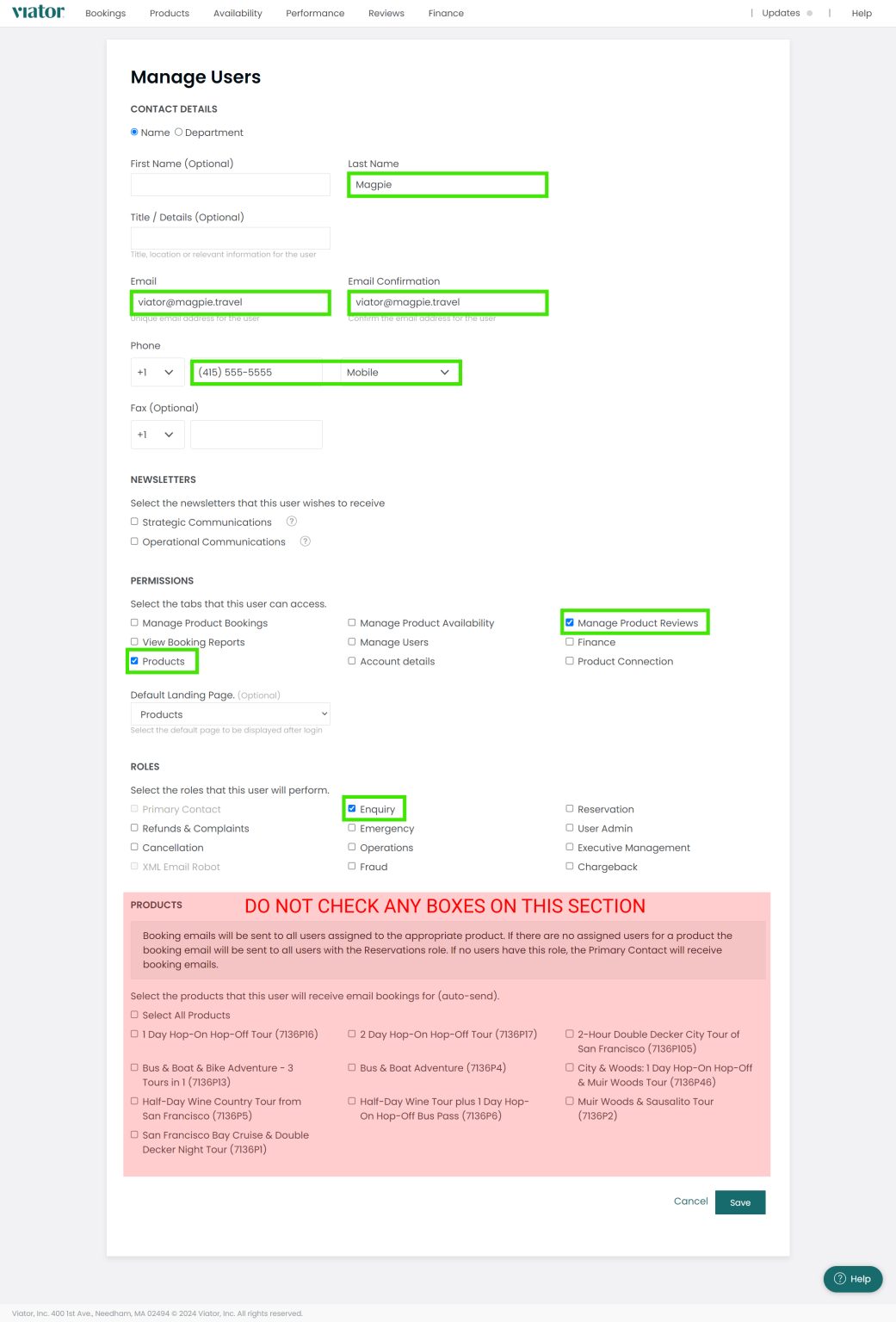
Step 4: Notify Magpie
Send an email to the Magpie support team with the following information:
- Confirmation that you have added the user
- Your Magpie account name
- Your Viator account name
Timeline
Magpie will complete the import of your products and reviews (for Enterprise users) within two business days of receiving your notification.
Important Notes
- Review management functionality is available to Enterprise-tier users
- Ensure your Viator account credentials are up to date before initiating the connection
- After the import is complete, your Viator products will appear in your Magpie product catalog